Updated 2/6/2026
Education User Manual/Audio Settings
Here, you can select the microphone or speaker you want to use. The microphone setting supports multiple selections.
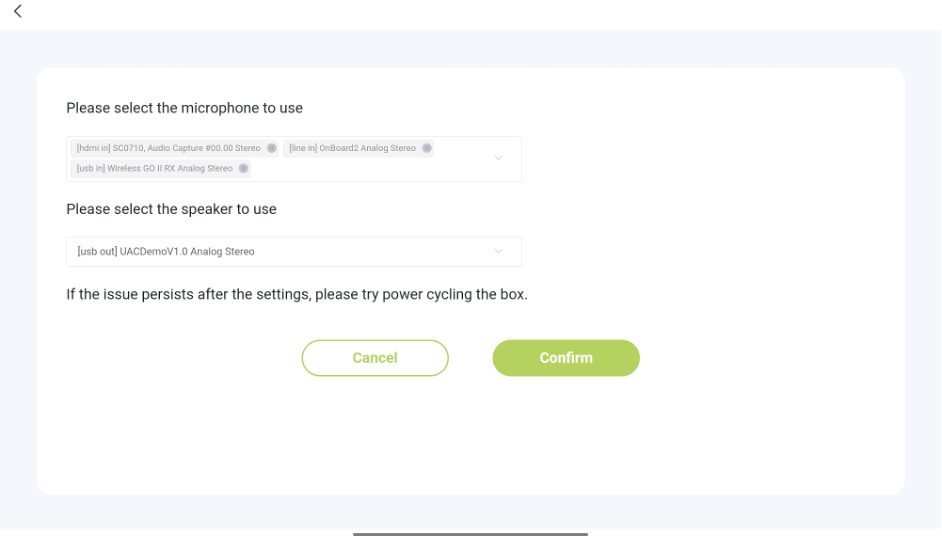
A few points to note:
1. The default selected speaker is [line out]. If there is a change to the device, it can be modified in the audio settings.
2. The default selected microphone is [line in]. If there is a change to the device, it can be modified in the audio settings.
3. If the microphone name contains [HDMI in], it means the source is the device plugged into the HDMI in port of the box.
4. If the microphone name contains [USB in], it means the source is the microphone plugged into the USB port.
5. If the microphone name contains [line in], it means the source is the microphone plugged into the line in (3.5mm small, round) port.
6. If the speaker name contains [HDMI out], it means the source is the device plugged into the HDMI out port of the box.
7. If the speaker name contains [USB out], it means the source is the speaker plugged into the USB out port.
8. If the speaker name contains [line out], it means the source is the speaker plugged into the line out port.